 The LED creator
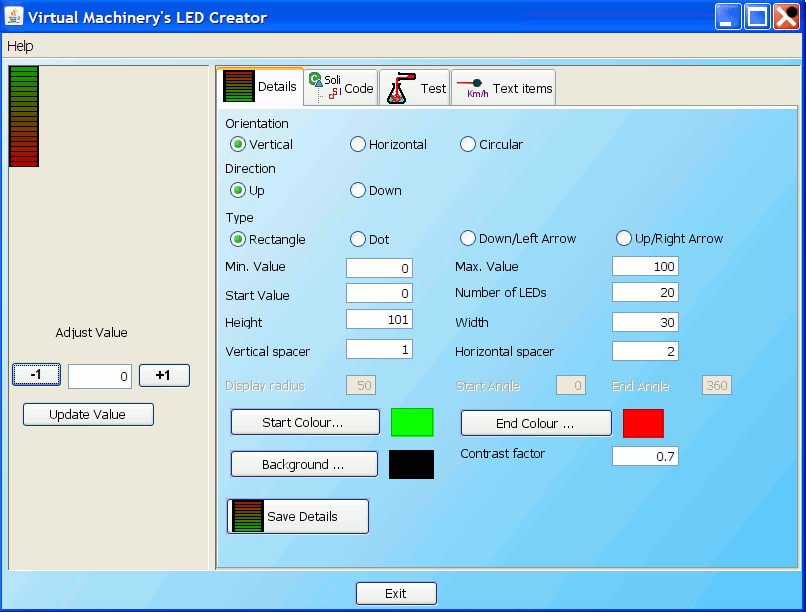
When you first start up the LED Creation application you will see the screen above - the screen has a number of tabs each of which contributes to the appearance of the LED style widgets created by the application. Some of these are specific to the creation of LED widgets and are covered in this document. Others are common to a number of the applications and are covered in other places. The tabs in the LED creator application are listed below - follow the links to find out more about each of these tabs and how they can help you create the LED widget that you want.
The LED details panel
The details panel is responsible for setting those parameters specifically relating to LED style indicators and allows you to adjust the following parameters -
- Orientation (Vertical Horizontal Circular)
- Direction (Up/right, down/left)
- Type (rectangle, dot, up/right arrow, down/left arrow)
- Min Value - The minimum value represented by the LED display. The point which represents the minimum value will depend on the Orientation and direction of the display
- Max Value - The maximum value represented by the LED display.
- Start Value - The value indicated by the LED Display is first shown
- No. of LEDS - the number of LEDs in the display
- Height - The height of the display in pixels
- Width - the width of the display in pixels
- Vertical spacer - the vertical distance in pixels between the LEDs and the edge of the display
- Horizontal spacer - the horizontal distance in pixels between the LEDs and the edge of the display
- Display radius - (circular orientation only) - Radius of the circular LED display in pixels
- Start angle - (circular orientation only) - start angle of the circular LED display
- End angle - (circular orientation only) - end angle of the circular LED display
- Start Colour - The colour equating to the minimum value represented by the display
- End Colour - The colour equating to the maximum value represented by the display
- Background Colour - the background colour of the LED display
When you are finished editing these details you can save them by clicking the save changes button and the LED indicator in the illustrative panel will be updated to reflect the changes.
|